PRODUCT PROTOTYPE STORIES – Daily Tracking Assistant
Context
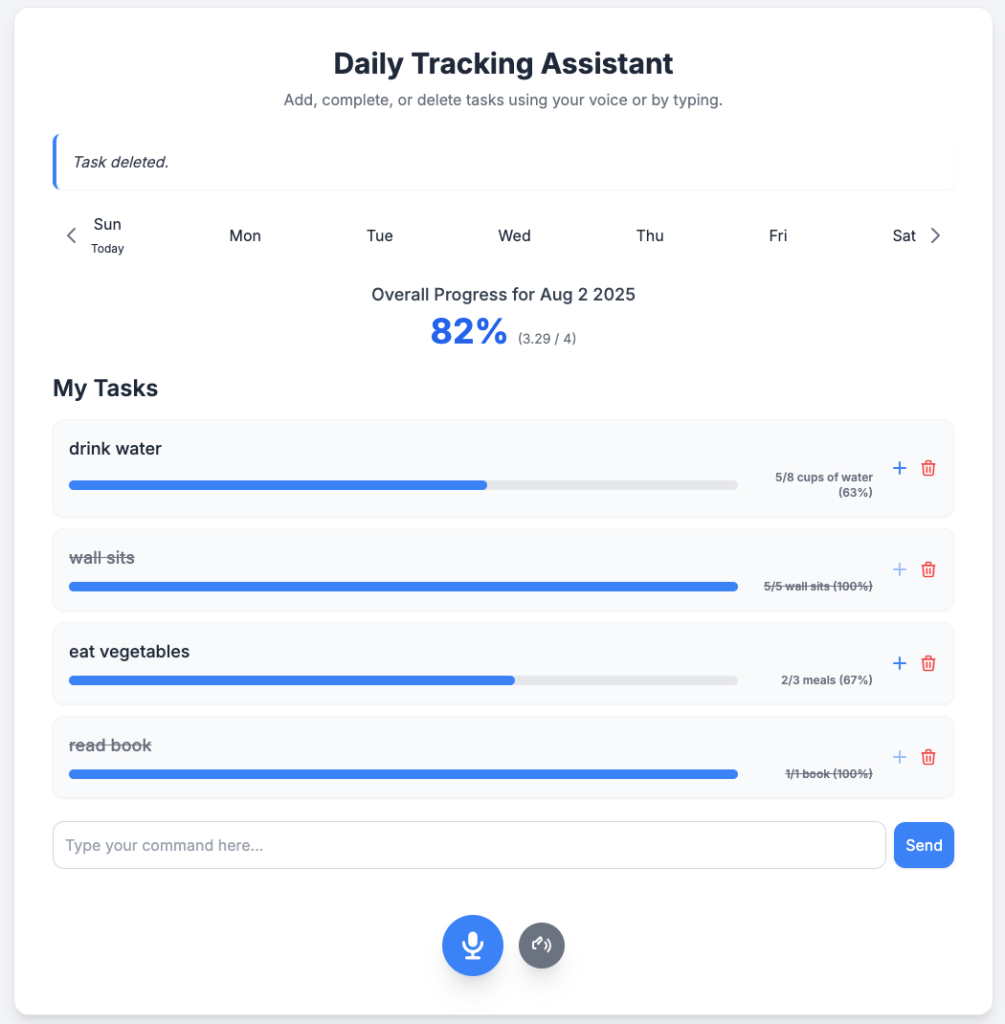
I started with an idea to create a daily to-do tracker assistant which can allow me to add tasks and mark them complete by either typing instructions to this assistant or speaking into the microphone. Something like having my personal assistant, keeping me in check with regards to daily goals.
User Story
I am a busy individual that has trouble holding myself accountable for daily tasks I need to complete to improve my life. These tasks tend to be health and wellness related and tend to get missed throughout the day.
“As a busy individual I want an assistant to help me track tasks to do and tell me how much I have completed each day so that I can achieve my wellness goals”
Development method of choice
Vibe coding – I decided to use this approach based on a suggestion my husband gave me so I could make quick prototypes of applications without heavy investment in time or resources.
AI Model
Gemini chat interface, with Canvas enabled in order to perform vibe coding. This allowed me to iteratively instruct the assistant to code & visualize the app prototype I was trying to build on the go.
Basic features
- Speech or text input of daily tasks I want to complete
- Speech or text input to mark fully completed or partially completed tasks
- Weekly view with day selector (Mon- Sun) in order to see tasks coming up in the week ahead or tasks completed in the week before
- Overall Progress tracking score % to indicate completion status
- Progress tracking bar with % complete as well as count of partial tasks completed within each task
- Undo button to undo tasks incorrectly marked as complete
- Mute button to mute assistant when i am in public spaces
- Tooltips with auto-generated instructions to explain what each button does
- Clear naming and high-level instructions on how to interact with the assistant
- Introduce delete function to delete tasks which are no longer required
Time it took
The first version of the app prototype covering basic features 1~4 took about 8 minutes for me to prompt, review, tweak and set up. I was stunned at how fast this was in enabling me to take an idea from 0 to 1. What would normally take my team of developers 1 month to get a working prototype ready, took less than 10 minutes.
I continued to iterate over the next 30min to add additional features (5~9) and found Gemini to be very easy to interact with, always showing me a preview of the app as the code kept getting improved.
Observed limitations
Several times I ran into a situation where the app generated had certain bugs, some which I could overcome by instructing another prompt to Gemini, but others, despite best effort to re-prompt, Gemini just never fixed.
*All bugs were observed via the preview window provided by Gemini’s Canvas
Bugs fixed with re-prompting:
- Recognition of partial tasks completed instead of marking a whole task complete
- i.e. daily task : drink 8 cups of water today
- I drank 3 cups of water today
- Hence, 3/8 (38%) of task was complete
- i.e. daily task : drink 8 cups of water today
Bugs NOT fixed even with re-prompting:
- Gemini Canvas was not correctly recognising today’s date and although it is 3 Aug 2025, it registered today as 2 Aug 2025. Several re-prompts could not fix this code issue
- Gemini Canvas was unable to introduce certain UI element styles such as coloring the specific day I selected green. Even though Gemini had responded saying it had been done, it clearly was not
Others:
- Potential UI design & Infrastructure limitation
- Gemini’s Canvas automatically applies a Google-style UI design and uses Google’s infrastructure (like Firebase), which may not be flexible enough for all projects. While the UI limitation might be overcome by providing the AI with a company’s design guidelines, the infrastructure choice could be a significant constraint for certain use cases.
- Gemini’s Canvas automatically applies a Google-style UI design and uses Google’s infrastructure (like Firebase), which may not be flexible enough for all projects. While the UI limitation might be overcome by providing the AI with a company’s design guidelines, the infrastructure choice could be a significant constraint for certain use cases.
- Scalability and Complexity are Unproven
- While it excels at building simple, single-feature apps, the tool’s ability to handle the code for more complex applications and to make that code scalable is an untested and significant concern.
Overall thoughts
In a span of 40 minutes I was able as a Product person to generate a relatively good prototype of a daily tracking assistant built fully using vibe-coding.
This presents many obvious benefits in terms of :
- Time saved from Product, UX design & Developers in explaining a product concept from 0 to 1.
- Increased flexibility in collecting evolving requirements from different stakeholders on-the-go (esp. Senior Executives) who would like to see high-fidelity UX wireframes prior to validating product teams to go ahead to build.
- Increased confidence in user workflows and alignment to final product launch
At this stage, Gemini Canvas is not yet able to fully replace human-written code or UX design, but it sure does a great job in initial prototyping in ideation phases with observed limitations.
TLDR
Using Gemini’s Canvas, a product manager with no coding required built a functional prototype of a daily to-do app in just 40 minutes, showing the power of AI for rapid development. While this approach dramatically accelerates the ideation phase, some bugs and UI limitations currently prevent it from replacing human developers.
 Product notepad